字符串的操作:
## 字符串转义 |
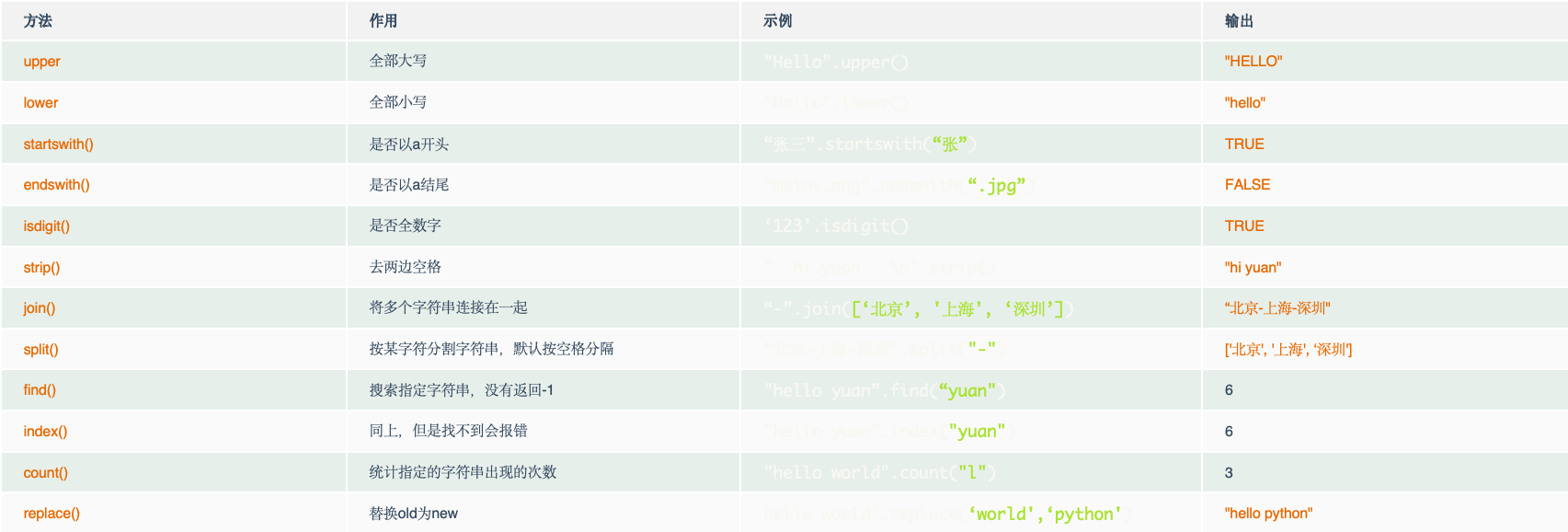
字符串的内置函数:
| 方法 | 作用 | 示例 | 输出 |
|---|---|---|---|
| upper | 全部大写 | “Hello”.upper() | “HELLO” |
| lower | 全部小写 | “Hello”.lower() | “hello” |
| startswith() | 是否以a开头 | “张三”.startswith(“张”) | True |
| endswith() | 是否以a结尾 | “meinv.png”.endswith(“.jpg”) | False |
| isdigit() | 是否全数字 | ‘123’.isdigit() | True |
| strip() | 去两边空格 | “ hi yuan \n”.strip() | “hi yuan” |
| join() | 将多个字符串连接在一起 | “-”.join([‘北京’, ‘上海’, ‘深圳’]) | “北京-上海-深圳” |
| split() | 按某字符分割字符串,默认按空格分隔 | “北京-上海-深圳”.split(“-“) | [‘北京’, ‘上海’, ‘深圳’] |
| find() | 搜索指定字符串,没有返回-1 | “hello yuan”.find(“yuan”) | 6 |
| index() | 同上,但是找不到会报错 | “hello yuan”.index(“yuan”) | 6 |
| count() | 统计指定的字符串出现的次数 | “hello world”.count(“l”) | 3 |
| replace() | 替换old为new | hello world’.replace(‘world’,‘python’) | “hello python” |